Agent Permissions
Note
The permissions listed on this page grant access to features that have to be enabled or configured system-wide in the Admin Panel first.

Agent permissions are shown in the middle of the New Role dialog…
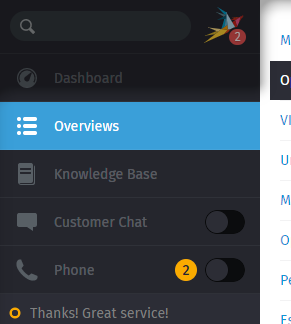
…and give users access to new sidebar tabs for communicating with customers.
Permission name |
Give access to |
Note |
|---|---|---|
|
Requires configuration of Chat Channel |
|
|
Configuration of a CTI integration is required |
|
|
Create/edit privileges |
Editor permissions always include reader permissions. |
|
Read privileges for internal content |
Public articles are always visible.
See here
how to set up granular reader permissions for the knowledge base.
Keep in mind that this may be dangerous, as reader permission provides
access to internal answers!
|
|
Make sure to never grant this permission to your customers
because it includes all ticket and user information across the
entire system! Consider setting up a new role for your admins or
supervisors and limit the access via Report Profiles and Reporting first.
|
|
|
Access to overviews and tickets. |
See notes below |
Note
🤔 What about this table under the permissions tree?

Roles can also include
group permissions!
The group permission table is shown
when there is more than one active group in the system and
ticket.agent permission is selected.