Trigger
Triggers are one way to automate Zammad. You can create if this then that
rules by defining which tickets should get changed and which changes you want
to apply to them. To manage triggers in Zammad’s admin settings under
Manage > Trigger, the permission admin.trigger is required.
Zammad ships one active trigger by default: an auto reply trigger which sends an email to the customer after a new ticket is created. You can disable it, modify it, or create new ones for all sorts of automation tasks.
Important Information
Triggers are executed when a ticket is updated by clicking the Update
button. Changing an element which doesn’t require an explicit ticket update
(e.g. setting a tag) does not necessarily lead to a trigger execution.
If a trigger runs due to an added article, the context for the trigger is always this last article. Triggers aren’t running based on older ticket states or articles.
In addition to triggers, there are also scheduler jobs for time-based automation, email filters for channel-based automation and macros for manually applying pre-defined changes via the UI. Depending on your use case, consider using them instead.
Configuration
Triggers consist mainly of three parts:
Activator: defines when and how the trigger has to be evaluated.
Condition: defines the tickets for which an action has to be executed based on attributes.
Actions: define what to change in a ticket which matches the condition.
Triggers are evaluated in alphabetical order by their name.
Activator
Choose between an action- or time-based activator in the Activated by section.
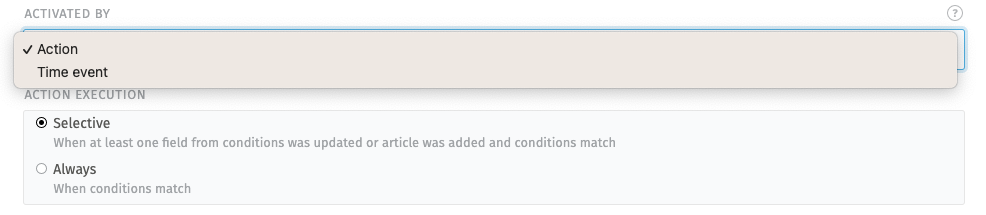
Action
An action based trigger always requires a ticket update to run. This can be an update by an agent or even internal system updates like updated SLA times. See the explanation below for more details.
- Selective
Checks if any attribute from the condition was updated OR an article was added and the condition matches. If the attributes of the condition weren’t touched and no new article was added, the trigger doesn’t run.
Example: A trigger with a condition for priority 1 low will run if the ticket was changed to 1 low.
- Always
Checks if the current state of the ticket matches the condition. This means: the trigger always runs when the ticket is updated and the condition matches, no matter what was changed. This can lead to more often executions of such a trigger.
Example: A trigger with a condition for priority 1 low will run if the ticket was moved to another group while priority was set 1 low.
Hint
If in doubt, use Selective. The Always action activator can lead to unexpected behavior, e.g. the trigger runs after internal system changes of the ticket, which aren’t visible in the ticket history.
Time Event
The execution is triggered when one of the following events occur:
Time of a reminder is reached
Escalation is reached
Escalation warning is reached
When such a time event is reached, the trigger runs if the condition matches. This is the same behavior as action-based activator’s “always” mode.
Condition
Use one or more attributes and values in a condition, which the tickets have to match you want to apply changes to. Create your condition in the Conditions for affected objects section:
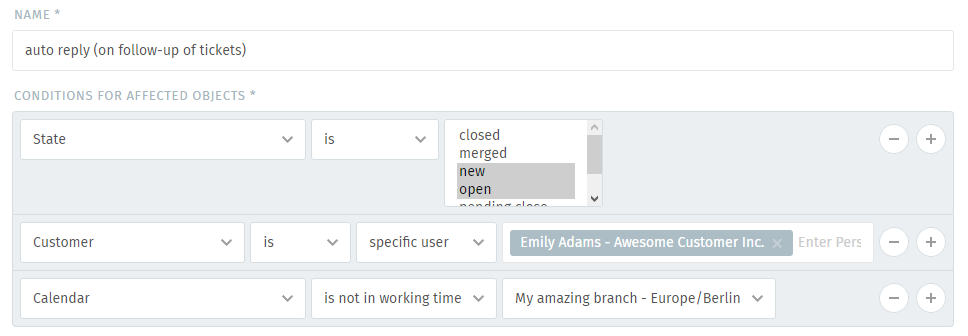
Hint
👋 Looking for more depth explanation on conditions? 🤓
Many condition settings in Zammad, no matter if in ticket scope or not, re-appear in several places of Zammad. For this reason we created a dedicated documentation section to avoid duplicate content.
Have a look at Object Conditions to learn even more! 🎉
Action
Define which changes to apply for tickets which match your condition in the Execute changes on objects section:
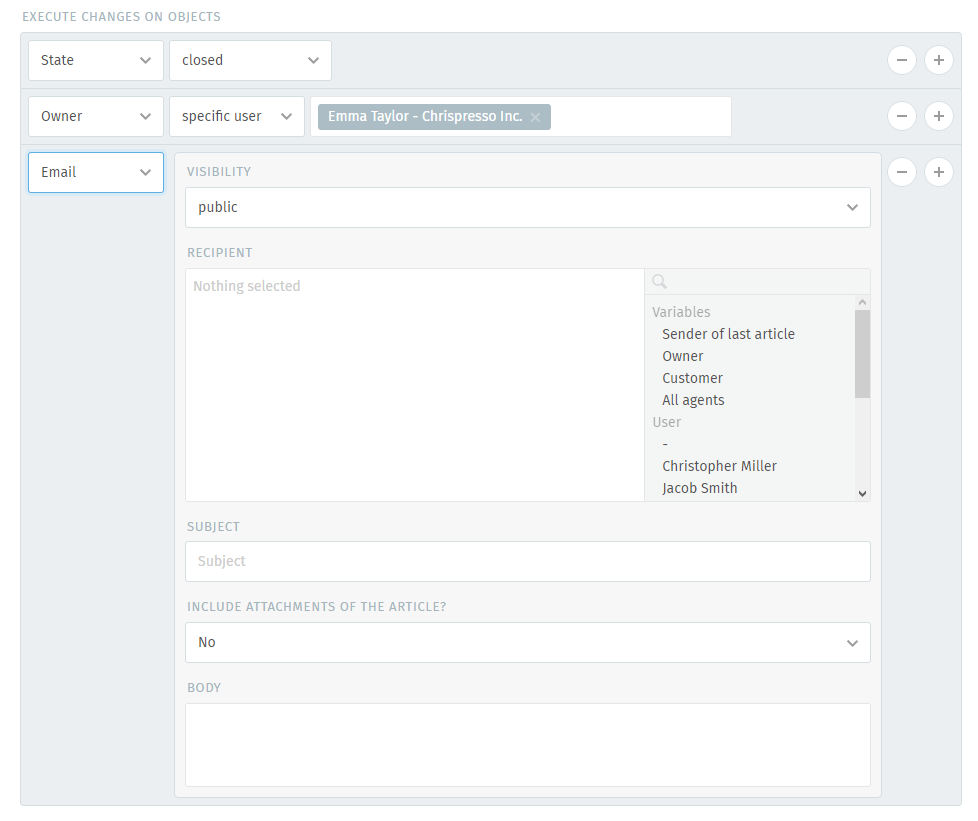
Hint
Certain actions (such as email, SMS and notes) support variables (see screenshot above), which can be used to build highly-customized message templates.
A trigger can do the following things once its conditions have been met:
- Modify the ticket
Examples: escalate its priority, close it, reassign it, rename it, add tags, subscribe and unsubscribe specific/all users, etc.
Date & time attributes (like Pending till) can be specified in absolute or relative terms.
You can also combine static text with placeholders for text fields. Remember that the placeholders’ values have to be known during trigger runtime. Learn more about variables.
- Send an email or SMS
Either to the customer, the agent who owns the ticket, or every agent in the system.
Sending emails allows you to include the attachments of the triggering article if required.
In order to send emails with triggers, you need to configure an email address for the group, the trigger is working in. If you don’t, Zammad will skip the trigger completely.
- Fire a webhook
Connect Zammad to another web service or application to give it live updates about new tickets.
- Add internal or public notes to the ticket
This allows you to help your agents with specific information if needed. (e.g. automated changes a trigger applied to the ticket)
- Run an AI agent
Trigger an AI agent to run using triggers.
Localization of Execution Changes
The system locale and timezone predefines a default format of date and timestamp replacement variables. These settings are customizable for triggers.

Best practice is to create single separated localized triggers for each language/timezone and execute them based on user or organization attributes.
The format and timezone of date and timestamp replacement variables is
customizable by the use of the dt() method. Further on the t() method
can be used to translated string replacement variables according to the selected
locale language.
For usage of the t() and dt() method, please follow the instructions in
the variables section.
Examples
To get you up and running quickly, here are some examples of the kinds of automation tasks you can set up with triggers.
- Group assignment based on customer
Any time Jacob Smith creates a ticket, assign it to the “Sales” group.
Condition: Customer is specific user Jacob Smith
Action: Group Sales
- Owner assignment based on subject
Emma Taylor is responsible for all sales internally, so if a new ticket has the word “order” in the subject, assign it to her and make sure it’s set with a high priority.
Condition: Title contains order
Action:
Group Sales
Owner specific user Emma Taylor
Priority 3 high
- Auto-reply based on channel and language
Send an auto-reply email to any customer who creates a ticket via web, if the detected language is English.
Condition:
Action is created
State is not closed
Type is web
Sender is customer
Detected Language is English
Action: Email (public, recipient: customer; with subject and body)
Note
Not all automated messages come from triggers!
For instance, when agents receive a system email about a newly created ticket, that’s built into the system itself. If you need to customize those, you will have to manually edit files on your server.