S/MIME
S/MIME is one method for secure email communication in Zammad (in addition to PGP). It is the most widely-supported method for secure email communication and allows you to exchange signed and encrypted messages with others.
- Потписивање
is proof that a message hasn’t been tampered with or sent by an impersonator. In other words, it guarantees the message integrity and authenticity.
- Шифровање
scrambles a message so that it can only be unscrambled by the intended recipient. In other words, it guarantees privacy and data security.
Once S/MIME has been enabled via the toggle at the top, Encrypt and Sign
buttons will appear in the ticket detail view when creating an email-based
article. For more details about how S/MIME works on the agent side, read the
secure email section in the user
documentation.
Предуслови
A certificate and private key for your own organization to sign outgoing messages and decrypt incoming messages.
Certificates belonging to your contacts or their issuing certificate authority (CA) to verify incoming message signatures and encrypt outgoing messages.
The usage of any expired (
Not After) or not yet valid (Not Before) certificate is not allowed for outgoing emails.
Белешка
Where to get a certificate? The easiest way to get certificates is to buy an annual subscription through a commercial CA, such as:
You can also generate your own self-signed certificates, but the process is complicated and usually involves extra work for your contacts. Bear in mind that S/MIME only works if the other party is using it, too.
Certificate and Key Handling
Add Certificates and Keys
When adding certificates and keys, Zammad validates them based on the
X509v3 extensions. If your certificate and private key are bundled together
in the same file or PEM block, import them twice (once using each button).
- Додај сертификат
Import public-key certificates for both your own organization and your contacts. You can add a bunch of certificates all at once by providing a single file with all relevant certificates.
In some cases (e.g. when dealing with large enterprises), you may be given a certificate for an entire certificate authority (CA), rather than a single contact. You can add it here as well to trust all certificates issued by that CA. Commercial CAs can usually be verified online. Zammad does not include a list of built-in, trusted CAs.
- Додавање тајног кључа
Once you’ve added a public-key certificate, you can import its matching private key. Private keys are for your own organization only; never ask your contacts for their private keys. A bulk import of private keys is not possible.
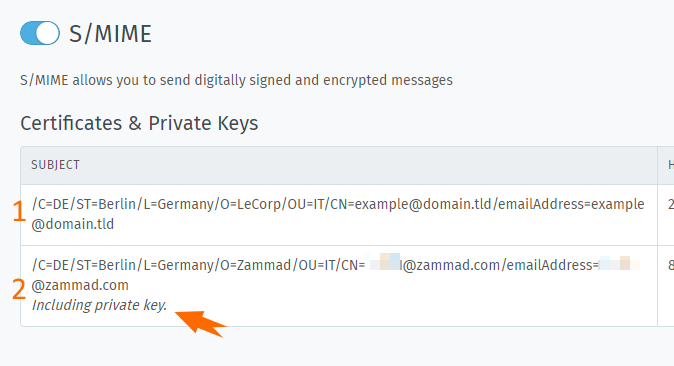
На сертификатима са одговарајућим тајним кључем приказана је напомена (погледајте други ред).
Certificate Validation
- Client certificate
The following attributes are required:
Subject Alternative Name (мора бити присутна најмање једна имејл адреса)
Key Usage (
Digital Signatureи/илиKey Encipherment)Public key algorithm (или
RSAилиEC)
The Extended Key Usage attribute is optional. If the certificate provides the named attribute, then it must contain the value
E-mail Protection. Any usable email address has to be prefixed withemail:orrfc822:. The named public key algorithms are mandatory for private keys as well.- CA certificate
In the case of an uploaded CA certificate, providing the value
CA:TRUEin the attribute Basic Constraints, the previously mentioned attributes are not verified.
Download Certificate or Key
You can download the previously provided certificates and private keys at any
time from your Zammad instance. Please note that passphrase-protected private
keys stay protected. When you download them, you have to know the passphrase to
use them after downloading. To download a certificate, use the ⠇ menu in the
Actions column and select Download Certificate. To download a private
key, use the other option labeled Download Private Key.
Delete Certificate and Key
To delete a certificate (with an optional private key included), use the ⠇ menu
in the Actions column and select Delete.
Подразумевано понашање
By default, Zammad tries to send all outgoing emails signed and encrypted, if possible. This behavior can be adjusted on a per-group basis. You can choose to sign only, encrypt only, both, or neither:
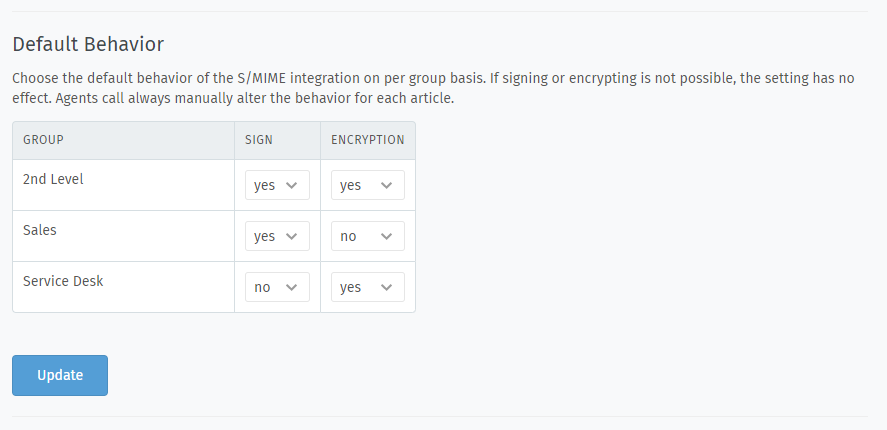
Agents can always override these settings for each email they send out.
Решавање проблема
All of the system’s latest S/MIME activity is displayed in the Recent Logs
section. The logs contain the status and details of all emails (both incoming
and outgoing), that used signing/verification or encryption/decryption.
This log does not include emails sent by
triggers or scheduler jobs.
For those, check your production.log.
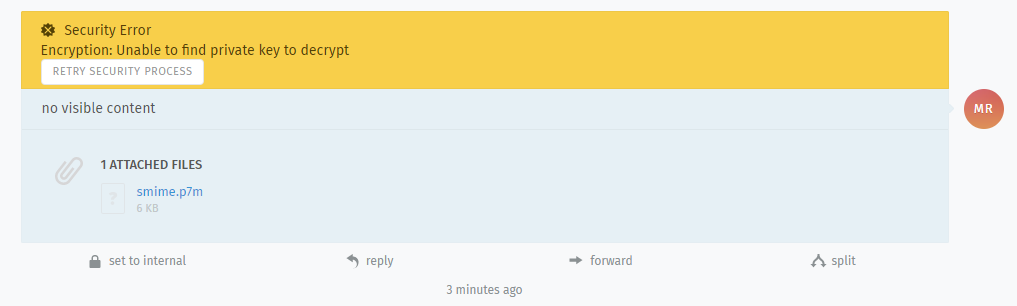
- Добио сам потписану/шифровану имејл поруку пре него што је подешена S/MIME интеграција
Нема проблема. Када се S/MIME укључи и додају одговарајући сертификати, оператерима ће бити пружена опција да поново покушају верификују/дешифрују одговарајуће поруке.
- Дугме
Шифровањеје онемогућено Да ли сте додали сертификат примаоца?
Да ли сте сигурни да је сертификат примаоца важећи?
Да ли сте проверили своју
production.logдатотеку за више детаља?
If encryption doesn’t work for outgoing email articles, it won’t work in triggers or scheduler jobs either.
- Дугме
Потписивањеје онемогућено Да ли сте додали и сертификат и тајни кључ за своју организацију?
Да ли се имејл адреса сертификата подудара са имејл адресом оператера/групе која саставља поруку?
- Error: „Fingerprint already taken”
Јесте ли сигурни да већ нисте додали овај сертификат?
- Error: „invalid byte sequence in UTF-8”
Обавезно обезбедите сертификат и кључеве у PEM формату.
Да ли сте проверили да ли дата датотека садржи важећи сертификат или кључ?